10 Common Website Mistakes Small Businesses Make
By River Sloan - SEO Principle at Denver Web Design
Your website should work for your business — not against it. Too many small business owners unknowingly make simple site mistakes that cost traffic, leads, and sales. This guide walks through ten common problems, how they hurt results, and practical fixes you can implement. We’ll cover slow load times, clunky mobile experiences, weak calls to action, SEO oversights, and more — with clear, actionable steps to improve your online presence.
What Are the Most Impactful Website Mistakes Small Businesses Make?
Small business sites tend to share the same pain points. Spotting these issues is the first step to a more effective website. The most impactful problems we see are:
Slow Loading Speeds: Pages that take too long to load frustrate visitors, increase bounce rates, and cost sales.
Poor Mobile Experience: As more people browse on phones, a site that isn’t responsive pushes potential customers away.
Lack of Clear Calls to Action (CTAs): When visitors aren’t told what to do next, conversions drop and opportunities are missed.
Neglecting SEO: Skipping basic search optimization makes it hard for customers to find your business online.

How Do Slow Loading Speeds Affect Small Business Websites?
Slow pages directly hurt conversions and user trust. Research shows a one-second delay in load time can reduce conversions by about 7%. Visitors expect fast sites; delays lead to abandonment and can damage your reputation. To speed things up, focus on image optimization, browser caching, and cutting unnecessary HTTP requests.
Why Is Poor Mobile Experience a Critical Issue for Small Businesses?
With more than half of web traffic coming from mobile devices, a bad mobile experience costs customers. Non-responsive layouts, slow mobile pages, and confusing navigation all lead to frustration and drop-offs. Prioritize responsive design, fast load times, and simplified mobile navigation to keep users engaged.
How Can Small Businesses Fix Website Performance Issues?
Improving performance doesn’t have to be technical or expensive. Start with a few high-impact changes that deliver the biggest payoff:
Optimize Images: Compress images so files are smaller but still sharp—this cuts load time instantly.
Minimize HTTP Requests: Reduce the number of page elements by combining files and simplifying design to lower load overhead.
Leverage Content Delivery Networks (CDNs): CDNs serve assets from servers near your visitors, cutting latency and speeding up delivery.

What Steps Improve Website Loading Speed Effectively?
Make these fixes to see measurable speed gains:
Image Optimization: Compress, resize, and use modern formats before uploading.
Reduce Redirects: Every redirect adds time—remove unnecessary redirects to streamline loading.
Enable Compression: Turn on Gzip or Brotli to shrink files sent from your server to browsers.
How to Ensure Mobile-Friendly and Responsive Web Design?
Follow these practical habits to make your site work across devices:
Responsive Design Principles: Use flexible grids and components that adapt to different screen sizes.
Mobile Testing: Regularly test pages on a range of phones and tablets to catch usability gaps.
Use Mobile-Friendly Navigation: Keep menus short, use clear labels, and make buttons easy to tap.
Why Are Clear Calls to Action Essential for Small Business Websites?
CTAs guide visitors to the next step—buy, book, call, or subscribe. Clear, well-placed CTAs lift conversions by removing guesswork and focusing attention on the desired action.
Definition of CTAs: CTAs are direct prompts that tell users what to do next on a page.
Impact on Conversion Rates: Strong CTAs placed where users are ready to act can significantly boost engagement and sales.
Examples of Effective CTAs: Direct phrases like “Get Started Today” or “Sign Up Free” make the next step obvious.
How Do Effective CTAs Drive Conversions?
Good CTAs use clear, action-oriented language, visual contrast, and smart placement to create urgency and remove friction. Put CTAs where users are most ready to act—end of articles, landing pages, and product sections—to guide them forward.
What Are Common CTA Mistakes and How to Correct Them?
Many CTAs fail because they’re vague, buried, or lack urgency. Fix them by:
Use Clear Language: Tell visitors exactly what will happen when they click.
Test Different Placements: Experiment with positions, sizes, and copy to see what converts best.
Create Urgency: Add time- or quantity-based cues like “Limited time” to encourage action.
How Does SEO Impact Small Business Website Visibility and Success?
SEO is how customers find you online. Proper optimization increases organic traffic and improves the chances that visitors become customers.
Importance of SEO for Visibility: SEO helps your site show up higher in search results, so more potential customers see you.
Common SEO Mistakes: Skipping keyword research, neglecting meta tags, and weak content all reduce search performance.
Benefits of Local SEO: Local SEO helps drive nearby customers—especially important for brick-and-mortar and service-area businesses.
What Are the Common SEO Structure Mistakes Small Businesses Make?
Common structural issues include missing title tags, poorly used header tags, and unoptimized images. To improve your SEO structure, do the following:
Optimize Title Tags: Give each page a unique, descriptive title that includes relevant keywords.
Use Header Tags: Structure content with H1/H2/H3 tags to make pages readable for users and search engines.
Optimize Images: Use descriptive filenames and alt text so images contribute to SEO.
How Can Local SEO Services Boost Denver Small Business Presence?
Local SEO can make a big difference for Denver businesses. Tactics like claiming local listings and using neighborhood keywords bring more nearby customers through your door:
Claiming Google Business Profile Listings: Make sure your business info is accurate and complete for local searches.
Encouraging Customer Reviews: Reviews build trust and help your listing rank higher in local results.
Using Local Keywords: Include neighborhood and city terms in content to target geographically relevant searches.
What Design and Content Errors Harm Small Business Websites?
Design and content missteps can undercut credibility fast. Fixing these basics improves perception and keeps visitors on your site longer.
Common Design Flaws: Bad color choices, cluttered pages, and inconsistent branding distract users and reduce trust.
Content Quality Issues: Thin, unclear, or outdated content fails to engage and hurts SEO.
Impact on User Experience: A clean design and helpful content build trust and encourage visitors to explore further.
How Does Outdated Website Design Affect Credibility?
A dated site can make your business look behind the times. Visitors often judge credibility in seconds, so keep your design current and aligned with professional standards to build trust.
Why Is High-Quality Content Vital for Small Business Websites?
Useful, well-written content attracts visitors, answers their questions, and supports SEO. Focus on helpful resources that address customer needs to bring repeat traffic and stronger conversions.
How to Address Navigation, Trust, Contact, and Security Issues on Small Business Websites?
Clear navigation, visible trust signals, easy contact options, and solid security are fundamental to a trustworthy site. Address these areas to improve user confidence and reduce friction.
Importance of Clear Navigation: Visitors should find what they need in seconds. A concise menu and search tool keep people on your site.
Building Trust with Users: Testimonials, certifications, and visible customer stories reassure new visitors.
Security Best Practices: SSL, updates, and regular audits protect data and show users you take security seriously.
What Makes Website Navigation Confusing and How to Simplify It?
Confusing menus and hidden pages make users leave. Simplify navigation by:
Limit Menu Items: Keep top-level navigation focused on the pages visitors care about most.
Use Descriptive Labels: Use plain language for menu items so users know exactly what they’ll find.
Implement a Search Function: A search bar helps visitors quickly locate specific information.
How Do Trust Signals and Contact Information Build Credibility?
Trust signals and easy contact options are essential for turning visitors into customers. Make these a priority:
Display Customer Testimonials: Real reviews and case snippets build confidence with new visitors.
Provide Clear Contact Information: Make phone, email, and location easy to find—don’t bury them.
Use Security Badges: Security seals and clear privacy statements reassure visitors about their data.
Why Is Website Security Crucial and How to Fix Vulnerabilities?
Security protects your customers and your reputation. Regular checks and basic protections go a long way:
Regular Software Updates: Keep CMS, plugins, and themes current to close known vulnerabilities.
Implement SSL Certificates: SSL encrypts user data and is expected by modern browsers and visitors.
Conduct Security Audits: Routine scans and audits help spot and fix vulnerabilities before they become problems.
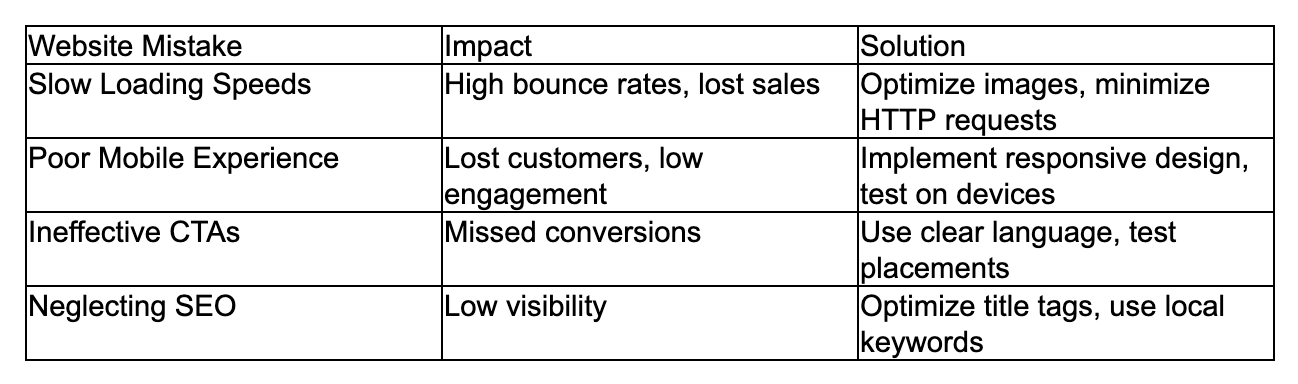
The table above sums up common website mistakes, their effects, and straightforward solutions. Tackle these areas first to improve user experience, visibility, and conversions for your small business.